Setlane is our app, so treat this as a comparison written by one of the two sides. Strong’s features are taken from its help center and App Store listing. Setlane prices were checked on October 20, 2026; Strong prices come from its US App Store listing on the same date.
In one minute
- Stay with Strong if you train with an iPhone or Apple Watch, rely on years of history you want to browse for free, or sync workouts to Apple Health.
- Try Setlane if you train with an Android phone and want an assistant to read your log and tell you what is progressing, or if you want warm-up and plate calculators without paying for PRO.
- The core logging is close: both have three free templates, automatic rest timers, RPE, supersets and warm-up and drop-set tags.
Setlane and Strong at a glance
| What matters | Setlane | Strong |
|---|---|---|
| Devices | Android | iPhone, Android and Apple Watch |
| Analysis with ChatGPT or Claude | Built-in connection, read-only or editing access | No connection |
| Adjusting weight or reps | − and + in the set row, or type | − and + on the number pad, which opens after tapping the field |
| Free templates | 3 routines | 3 templates |
| Old workouts on Free | Last 90 days in the app; all of them in a CSV export | All of them |
| Warm-up and plate calculators | Free | PRO |
| RPE, supersets, warm-up and drop sets | Free | Free |
| Health app sync | None | Apple Health; Health Connect in the Strong 6.0 beta for Android |
| Pro, monthly | $4.99 | $4.99 |
Changing a set mid-workout
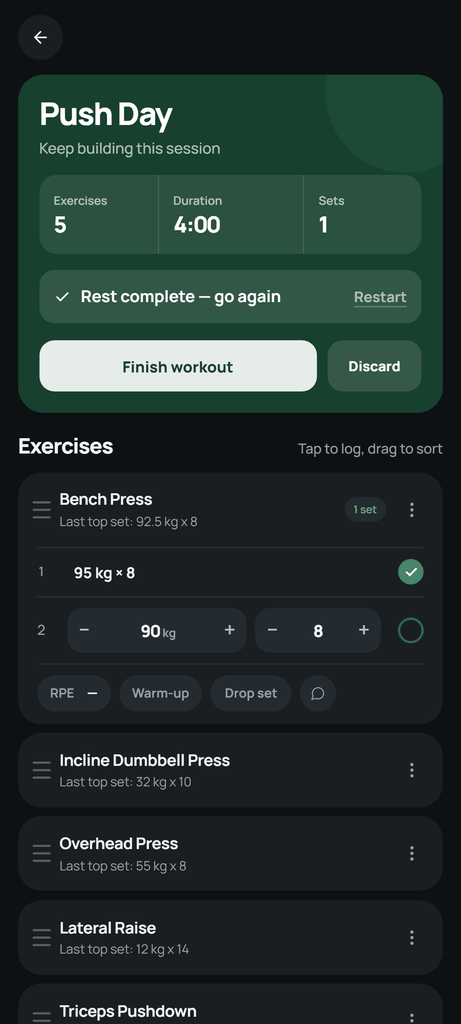
Both apps work the same way at the start of a set: the last session’s numbers are already in place, and ticking the set starts the rest timer. Strong lets you give warm-up and working sets different rest durations; Setlane lets you give each exercise its own.
The gap appears when the set does not go to plan. Say you planned 100 kg × 5 on the squat and only got four reps, or the last set moved fast enough to try 102.5 kg next time. In Strong, you first tap the weight or reps field. That opens its number pad, which has − and + buttons alongside the digits, and only then can you step the value or type it. The pad is also where PRO users open the plate calculator.
In Setlane, − and + sit directly in the set row, on both sides of the weight and of the reps. Four reps instead of five is one tap on the reps −; 102.5 kg is one tap on the weight +. That saves the tap that opens the pad every time, and nothing covers the workout, so the next exercise and the timer stay on screen. When you need a big change, tap the number and type it.
The weight step belongs to each exercise. It starts at 2.5 kg or 5 lb, and you can change it for a cable stack that moves in 5 kg jumps or for dumbbells that go up in 2 kg steps.
Training analysis with ChatGPT or Claude
This is the clearest difference between the two apps. A workout log answers “what did I lift?”. Setlane’s connection lets you also ask “what is working?” and get an answer based on your own sets.
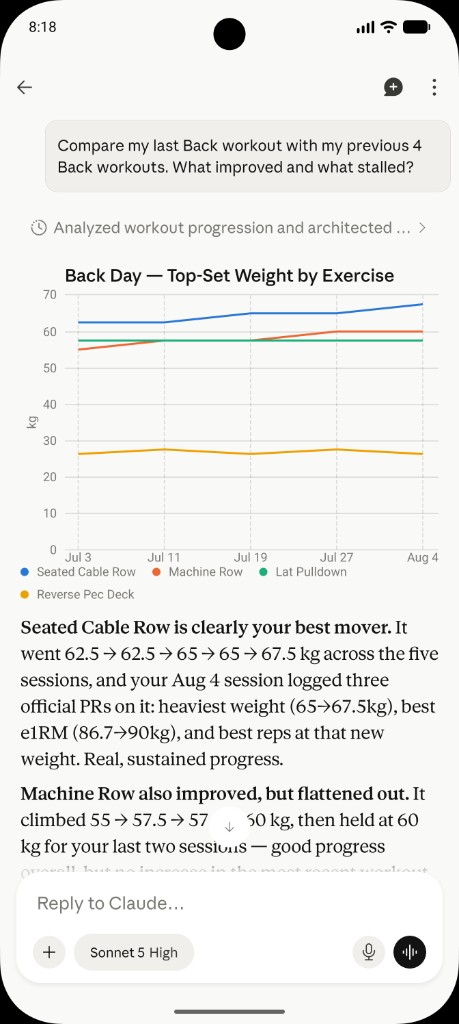
The screenshot below is a real request: “Compare my last Back workout with my previous 4 Back workouts. What improved and what stalled?” Claude read the five sessions from Setlane, charted the top set of each exercise and found that the seated cable row climbed from 62.5 to 67.5 kg with three new records, while the machine row had held at 60 kg for two sessions.
Other questions that work well:
- How has my weekly training volume changed over the last eight weeks?
- Which exercises have I not progressed on in a month?
- My bench press dropped this week. Did anything change in sets, reps or rest days before it?
- Fix the third set of yesterday’s squat: it was 100 kg, not 110 kg.
- Build a three-day upper/lower routine from exercises I already do and save it.
You choose the access level when you connect. Read-only lets the assistant analyze; editing access lets it save the changes you ask for, such as correcting a set or creating a routine. It cannot touch a workout that is in progress. Setlane Free includes 60 tool calls a month, and one question can use several; Pro has no monthly cap. Like the app, the assistant reads the last 90 days of workouts on Free and your whole history on Pro. You use your own ChatGPT or Claude account.
Strong has no ChatGPT or Claude connection; its integrations are Apple Health, nutrition tracking and, in the Strong 6.0 beta for Android, Health Connect. The closest you can get is exporting a CSV and uploading it to a chat. That file is a snapshot: export it again whenever you want the assistant to include new or corrected workouts, and it cannot save anything back to Strong. How Setlane’s connection works
What Strong does better
- iPhone and Apple Watch. Strong’s watch app logs sets and adjusts weights and reps, and Live Sync keeps the watch and phone on the same workout. Setlane has no iPhone or watch app.
- Your whole history for free. Strong keeps every workout available without PRO. Setlane Free shows the last 90 days in the app; older workouts are stored and exportable, but you need Pro to open them in Setlane.
- Health app sync. Strong syncs workouts with Apple Health, and its 6.0 beta for Android adds Health Connect. Setlane does not sync with health apps.
- A failure tag. Both apps mark warm-up and drop sets. Strong can also tag a set as failed; Setlane has no failure tag.
What Setlane does better
- An assistant that knows your training. ChatGPT or Claude reads your synced log, answers questions about progress and, with your permission, makes changes for you.
- Fewer taps between sets. − and + for weight and reps right in the set row, with a custom step for each exercise.
- Calculators without PRO. The warm-up calculator builds your warm-up from percentages of the working weight, and the plate calculator shows what to load on each side. Both are in Strong PRO.
- Progress on Free. The Progress dashboard (volume, sets, duration, workout count), muscle-group progress and the weight chart for each exercise are free within the 90-day window. Strong reserves full chart access for PRO.
- A cheaper first year and lifetime. See the prices below.
Free plans and history
Three free templates in Strong and three free routines in Setlane, so neither solves a template limit. The real difference is time. Strong’s free plan keeps every past workout open; it limits charts and tools instead. Setlane’s free plan gives you more tools and charts, but only for the last 90 days.
If you have five years of Strong history and like scrolling back through it, that matters. If you mostly look at the last few months and want analysis and calculators, Setlane Free covers more. Either way, Setlane’s CSV export always includes your full history, without Pro.
Setlane and Strong prices in USD
| Plan | Setlane Pro | Strong PRO |
|---|---|---|
| Monthly | $4.99 | $4.99 |
| Annual | $19.99 first year; then $29.99 | $29.99 |
| Lifetime | $49.99 until October 31, 2026; then $69.99 | $99.99 (PRO Forever) |
Monthly prices are the same, and so is the annual price from the second year on. Setlane saves $10 in the first year and $50 on lifetime during the launch offer ($30 after it). Sources: Setlane pricing, Strong on the App Store.
Moving your Strong history
In Strong, open Settings and choose Export Data to save a CSV. In Setlane, open Settings → Account → Import workouts, pick the file, confirm the units and time zone, match exercise names and check the preview before saving. Import is free and needs an internet connection and a permanent account.
Completed workouts with their weights, reps and RPE come across; saved templates, distance and set duration do not. On Free, sessions older than 90 days are imported and stored but stay locked in the app until you upgrade. The assistant sees the same history as the app: the last 90 days on Free, everything on Pro. Import guide with screenshots · Strong export help
Which app should you pick?
Strong is the better fit if you
- train with an iPhone or log from an Apple Watch;
- want every old workout open without paying;
- sync training to Apple Health.
Setlane is the better fit if you
- train with an Android phone;
- want ChatGPT or Claude to analyze your progress and help with routines;
- want warm-up and plate calculators without a subscription.
Frequently asked questions
Can Strong connect to ChatGPT or Claude?
No. Strong’s integrations are Apple Health, nutrition tracking and, in the Strong 6.0 beta for Android, Health Connect. You can export a CSV and upload it to a chat, but the file does not update on its own and the assistant cannot save changes back to Strong. Setlane connects to ChatGPT and Claude directly.
Can I move my Strong history into Setlane?
Yes, on Free and Pro. Export a CSV from Strong, match exercises in Setlane and review the preview before importing. Templates are not transferred, and on Free, workouts older than 90 days need Pro to view in the app.
Does Setlane work on iPhone or Apple Watch?
No. Setlane is an Android app. Strong has apps for iPhone, Android and Apple Watch.
Is Strong free for more than three workouts?
Yes. The free limit is three saved templates, not three workouts. You can log as many workouts as you like on Strong’s free plan.