We make Setlane, so this is a comparison from one side of the table, not an independent review. What we say about Hevy comes from Hevy’s own feature pages and help center. Prices are in USD and were checked on October 20, 2026.
The short answer
- Pick Hevy if you use an iPhone, log from Apple Watch or Wear OS, want to train alongside friends, or want the app to build and progress a program for you.
- Pick Setlane if you train with an Android phone, want both training calculators without paying, or want to go through your log with ChatGPT or Claude.
- Both log RPE, supersets, drop sets and warm-up sets on their free plans, so you can try the same workout in each before deciding.
Setlane vs Hevy at a glance
| What matters | Setlane | Hevy |
|---|---|---|
| Devices | Android | iOS, Android, Apple Watch, Wear OS and web |
| Changing weight or reps during a set | − and + buttons, or type the value | Type the value on the keyboard |
| Free routines / custom exercises | 3 / 5 | 4 / 7 |
| Progress on Free | Progress dashboard and weight chart; workouts from the last 90 days | Exercise graphs for the last three months |
| AI | ChatGPT and Claude, read-only or editing access | Hevy app in ChatGPT; Trainer program generator in Pro |
| Social features | None | Feed, profiles, shared routines and leaderboards |
| Warm-up calculator | Free | Pro |
| Plate calculator | Free | Free |
| RPE, supersets, drop sets, warm-up sets | Free | Free |
| Pro, monthly | $4.99 | $2.99 |
Logging a set: where the two apps actually differ
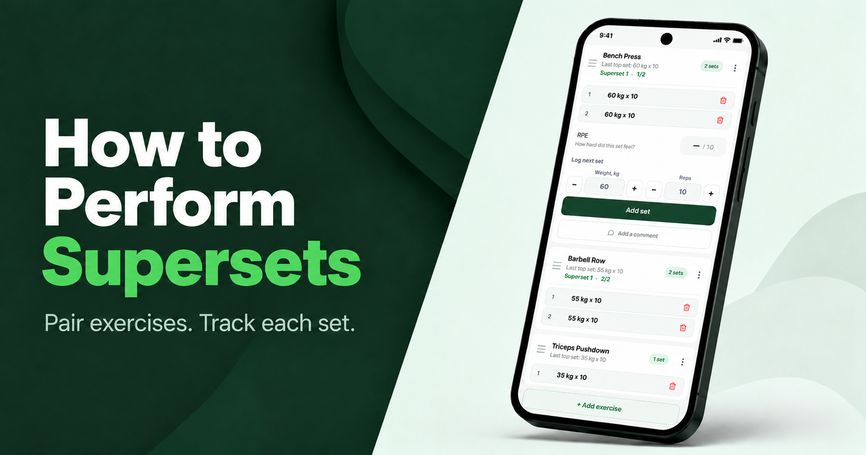
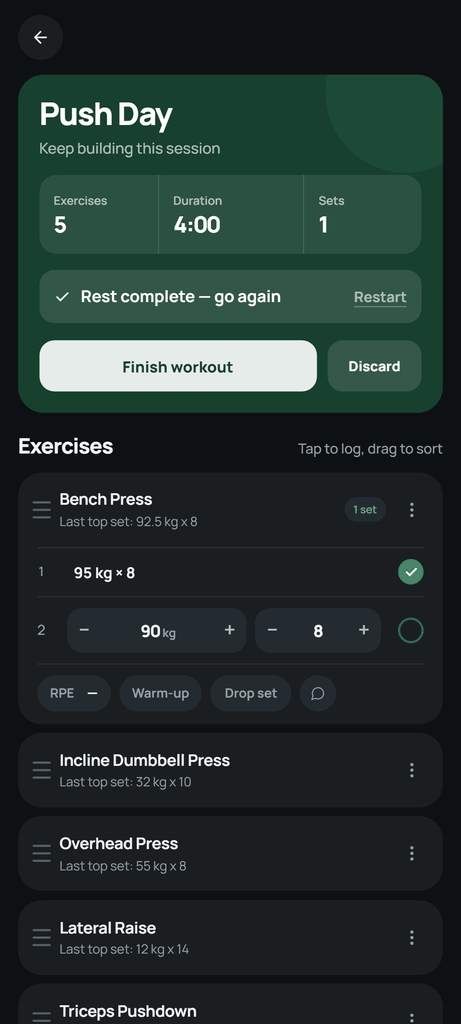
The workout screens have a lot in common. Both show what you lifted last time, pre-fill the next set, start the rest timer when you tick a set off and let you mark warm-ups, drop sets and RPE. If the pre-filled numbers are right, you just tick the set in either app.
The difference shows up when the numbers need changing, which happens all the time. Last week felt easy, so you add 2.5 kg. You get one rep fewer on the third set. You lower the weight for a back-off set. In Setlane, the weight and the reps each have − and + buttons on either side of the number. One tap changes the weight by the exercise’s step and the reps by one. For a big jump, tap the number and type it.
In Hevy, weight and reps are input fields. To change either one, you tap the field, type the new value on the phone keyboard and close the keyboard. It only takes a few seconds, but you do it many times a workout, with sweaty hands and the rest timer running.
| Situation | Setlane | Hevy |
|---|---|---|
| Same numbers as last time | Pre-filled; tick the set | Pre-filled; tick the set |
| Add 2.5 kg | One tap on + | Tap the weight field and type the new value |
| One rep short | One tap on − next to reps | Tap the reps field and type the new value |
| Jump from 60 to 100 kg | Tap the number and type it | Tap the field and type it |
The step is set for each exercise: 2.5 kg or 5 lb by default. A plate-loaded machine that only moves in 5 kg jumps, or a dumbbell rack that goes up by 2 kg, can have its own step, so + always lands on a weight you can actually load. In pounds, the step follows real plate jumps rather than converted values such as 5.51 lb.
Hevy has its own strengths during a session. Routines can store target weights, rep ranges, set types and notes. The previous-performance column can show your last session of that exercise or the last time you did it in that routine, which helps when the same lift appears on two training days. Both apps let you set a different rest time for each exercise.
Setlane logging works offline once you have signed in for the first time; syncing and the AI connection need the internet. Hevy workout logging · Setlane offline
Where Hevy is the better choice
- Devices. iPhone, Android, Apple Watch, Wear OS and a web app. Setlane is Android-only and has no watch app.
- Training with friends. A feed, profiles, comments, shared routines and leaderboards. Setlane has no social features.
- A program built for you. Hevy Trainer (Pro) builds a program around your goals, equipment and schedule, then raises the working weight once you reach the top of the rep range on every prescribed set. Setlane does not generate programs; it records the one you follow.
- A bigger free plan. Four routines and seven custom exercises, against three and five in Setlane. If you rotate four training days, that alone may decide it.
- Lower ongoing price. $2.99 a month or $23.99 a year, against $4.99 a month and $29.99 a year at renewal for Setlane.
Where Setlane is the better choice
- Faster edits between sets. − and + next to the weight and the reps change them in one tap, with a weight step you set for each exercise.
- Both calculators on Free. The warm-up calculator builds warm-up sets from percentages of your working weight; in Hevy it is part of Pro. Both apps include a plate calculator for free.
- ChatGPT and Claude, with editing. Either assistant can analyze your log and, with editing access, fix a set in a completed workout or reorder a routine. Hevy’s integration works in ChatGPT and focuses on plans and analysis.
- Cheaper first year and lifetime. $19.99 for the first year, and $49.99 for lifetime until October 31, 2026 ($69.99 after), against $23.99 a year and $74.99 lifetime for Hevy.
History and progress on the free plans
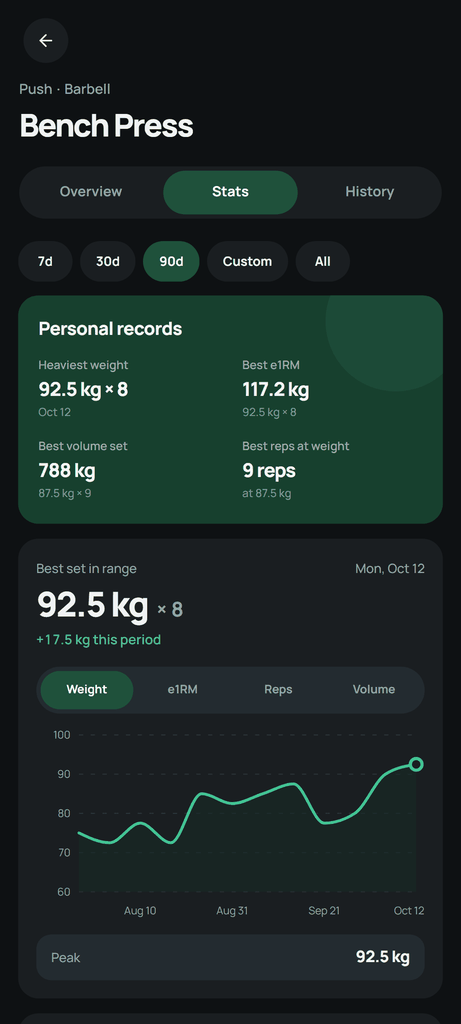
Both apps chart each exercise, keep personal records and let you open the workouts behind a result. The free plans limit different things.
Setlane Free shows workouts from the last 90 days in the app, plus the Progress dashboard (volume, sets, duration and workout count), muscle-group progress and the weight chart for each exercise. Older workouts stay stored and are included in a CSV export. Pro shows them in the app and adds e1RM, reps and volume charts, detailed records and custom date ranges.
Hevy Free keeps all your workouts but limits exercise graphs to the last three months; Pro extends them to all time. Its records include heaviest weight, estimated one-rep max and best set and session volume. If you have years of Hevy history and want to keep browsing it without paying, Hevy is the better place for it.
ChatGPT and Claude
Setlane connects your synced log to ChatGPT or Claude. You can ask which of your last four rowing sessions improved and by how much, or ask the assistant to fix a typo in a completed set or reorder a routine. Read-only access limits it to analysis; editing access lets it save the changes you ask for. It cannot change a workout that is in progress.
Setlane Free includes 60 AI tool calls a month, and one question can use several of them; Pro removes the cap. Your ChatGPT or Claude account is separate. Because the assistant works from the sets you actually logged, it can answer questions a chart does not, such as whether your squat stalled after you added a fourth training day. How the connection works
Hevy’s app for ChatGPT works in ChatGPT on the web and in the ChatGPT mobile app. It analyzes your progress, suggests a next workout and creates training plans that are saved to your Hevy account. It works with free Hevy and ChatGPT accounts. Hevy’s page does not mention a separate limit, but plans are saved to your account as routines, and the free plan holds four. It also does not mention editing workouts you have already logged, which Setlane’s connection can do. Hevy Trainer is a separate in-app program generator that requires Pro. Hevy in ChatGPT
Setlane and Hevy prices in USD
| Plan | Setlane Pro | Hevy Pro |
|---|---|---|
| Monthly | $4.99 / month | $2.99 / month |
| Annual | $19.99 first year; then $29.99 / year | $23.99 / year |
| Lifetime | $49.99 until October 31, 2026; then $69.99 | $74.99 |
Over two years on the annual plan, Setlane costs $49.98 and Hevy $47.98, so the gap is small. Hevy is cheaper month to month. Setlane’s lifetime option is $25 cheaper during the launch offer and $5 cheaper after it. Setlane’s annual plan includes a 14-day trial for eligible users. Sources: Setlane pricing, Hevy Pro prices.
Moving from Hevy to Setlane
Export your workouts from Hevy as a CSV file, then open Settings → Account → Import workouts in Setlane. You check the units and time zone, match exercise names and review a preview before anything is saved. Import is included in Free and needs an internet connection and a permanent account.
Completed workouts, set types, RPE and supersets come across. Saved routines, distance and per-set duration do not. On Free, imported sessions older than 90 days are stored but only visible in the app with Pro. Step-by-step import guide with screenshots
Which one should you choose?
Choose Hevy if you
- use an iPhone or log workouts from a watch;
- want friends, a feed or leaderboards in your training app;
- want the app to build your program and decide when to add weight;
- need four routines on the free plan, or want the lowest monthly price.
Choose Setlane if you
- train with an Android phone;
- want the warm-up and plate calculators without a subscription;
- want to review your training with ChatGPT or Claude and let the assistant make changes you approve.
Frequently asked questions
Does Hevy work with ChatGPT?
Yes. Hevy’s app for ChatGPT analyzes your progress and creates plans saved to Hevy, on the web and in the ChatGPT mobile app. Setlane connects to both ChatGPT and Claude and can also correct sets in workouts you have already logged.
Is Setlane cheaper than Hevy?
It depends on the plan. At USD prices checked on October 20, 2026, Hevy is cheaper monthly and on annual renewal. Setlane is cheaper for the first year and for lifetime access.
Can I import my Hevy history into Setlane?
Yes, on Free and Pro. Export a CSV from Hevy, match exercises and review the preview before importing. Saved routines are not transferred, and on Free, workouts older than 90 days need Pro to view in the app.